Stop Googling the same bug
twice.
Nine connected Notion databases for the bugs, AI conversations, and tech decisions you keep losing. Built for developers, not productivity influencers.
Launch price · Lifetime access · Instant Notion duplicate · 14-day refund
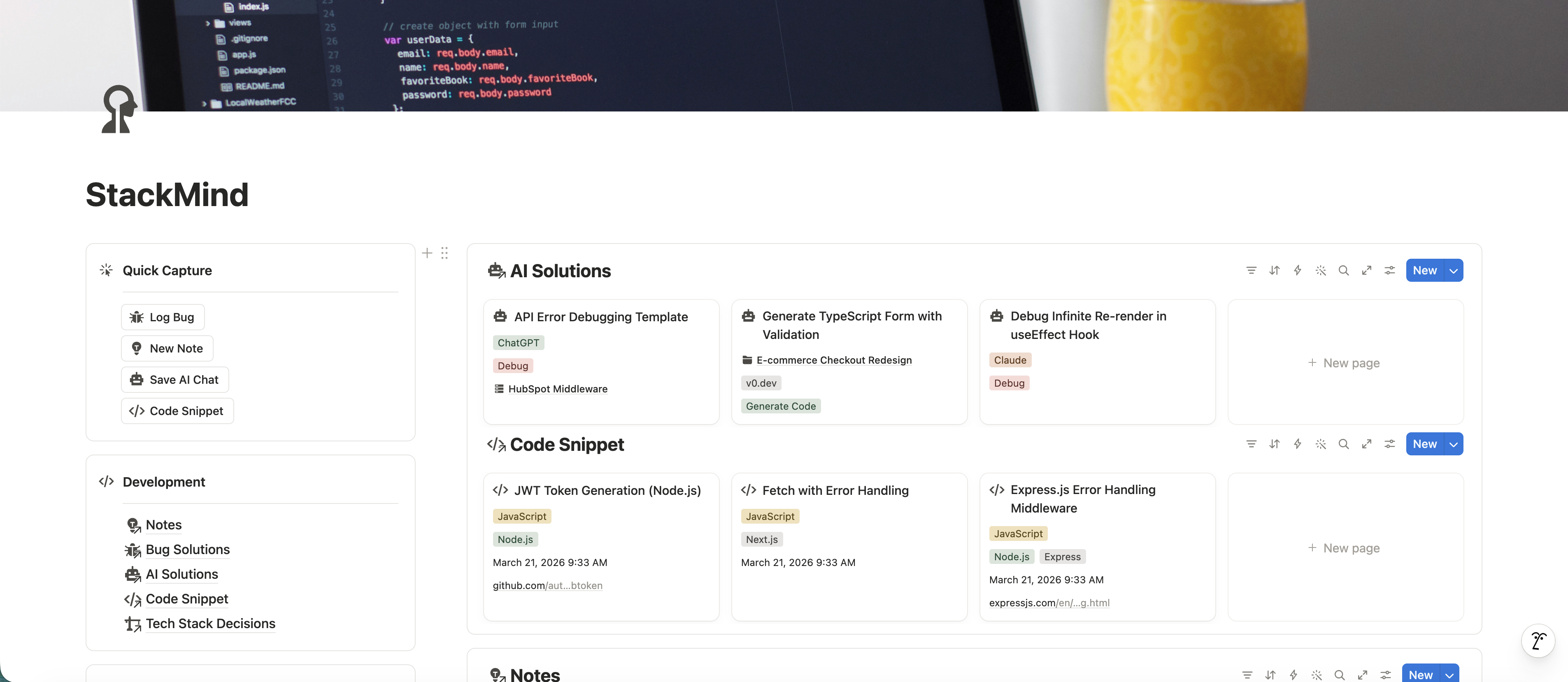
- Quick Capture
- One-click buttons to log a bug, AI conversation, snippet, or note without leaving the dashboard.
- Database overviews
- Recent entries from each of the nine databases, surfaced on one page.
- Cross-links
- Every entry is wired through Domains, so the structure builds itself as you log.
You've fixed this before.
You've fixed this CORS error before. You know you have. But the Stack Overflow tab is long gone, the ChatGPT conversation is buried, and now you're spending 40 minutes re-solving a problem you already solved.
Sound familiar? Try these:
- You had a great Claude conversation that generated the exact regex pattern you needed. Gone.
- You chose Clerk over Auth0 six months ago. Someone asks why. You can't remember.
- That Stripe webhook gotcha that isn't in the docs — the one that cost you 3 hours — is about to cost you 3 hours again.
- You learned about
structuredClone()last month. You've already forgotten it exists.
The problem isn't that you don't learn enough. It's that you have nowhere to put what you learn.
StackMind is your database.
Nine Notion databases, connected through relations, designed around the specific types of knowledge developers lose track of every day.
Log a bug fix in 30 seconds. Find it in 5 seconds, six months from now.
No PARA method. No habit tracker. No “build your second brain in 12 weeks” course. Just a working system, pre-built, with example entries already in the boxes so you can see how it works before adding your own.
9 databases · 30+ views· 30 example entries
Nine databases.
Each one designed around how a specific type of developer knowledge actually flows.
Bug Solutions
Problem, severity, technology, time-to-solve, source link. Every bug becomes a searchable entry. Sort by tech, severity, or how long it took you — and start spotting patterns in your own debugging.
AI Solutions
ChatGPT, Claude, v0.dev, Cursor — saved with the prompt, the response, the AI tool, the conversation link, and a category. Mark the best ones as Favorites so you stop rewriting them.
Code Snippet
Snippets organized by language and framework. Dual source tracking — where you found it and where the code lives (Gist, repo, local). Last-used and last-reviewed dates so stale snippets surface for cleanup.
Notes
The daily TIL database. Quick notes on the small things you learn — a flag, a method, a quirk — linked to the project and domain where you ran into them. Light schema, fast capture.
Domains
The connective tissue. Each domain — "E-commerce Platform," "Internal Billing Service," "HubSpot Middleware" — links to its bugs, snippets, prompts, notes, and resources. Tracks tech stack, status, team, and repository.
Skills
What you're learning, with skill level (learning / competent / expert) and priority (focus now / next up / someday). Last-practiced date so neglected skills resurface.
Projects
Side projects, work projects, learning projects. Status, progress, priority, deadlines, tech stack, repo and demo URLs. Linked to the bugs, snippets, and AI conversations the project produced.
Resources
Books, courses, articles, videos, repos, docs. Status (Saved / Learning / Completed), rating, type. The thing that finally turns 'I should read this' into 'I read this.'
Tech Stack Decisions
Lightweight architecture decision records. The decision, the category, the context behind it, the date, and the project it applies to. When someone asks “why Tailwind?” six months from now, you have the actual answer.
Everything connects.
This isn't nine separate databases. It's a knowledge graph.
Your bug links to a project. That project links to a domain. That domain connects to your code snippets, your notes, your AI conversations, and your learning resources.
The relations between databases mean you never have to manually organize. Log things as you go — the structure builds itself.
Two minutes to start.
The blank version always looks pointless. The version with one of your bugs in it suddenly looks useful.
- 01
Duplicate it.
One click in Notion. Five seconds.
- 02
Open the StackMind Walkthrough.
A two-minute walkthrough of the dashboard. Pre-loaded with example entries so you can see what filled-out databases look like before adding your own.
- 03
Log one thing.
Open Bug Solutions and log the most recent bug you fixed. Or paste a Claude conversation into AI Solutions. Or write one Note. Doesn't matter which — pick the one that's freshest.
- 04
That's it.
You're using it. Come back tomorrow and add one more thing. Do that for two weeks and you'll wonder how you ever worked without it.
Built by a developer.
I built StackMind because I was tired of fixing the same CORS error three times a year, losing great Claude conversations, and forgetting why I picked Clerk over Auth0 six months ago.
I'm a developer, not a productivity influencer. I built this because I needed it. The whole template is generated programmatically — Python orchestrates the build, the Notion API creates the databases and relations, and Playwright handles the parts the API can't reach. I'll write up the build story on the blog if you're curious. Either way, this is the first thing I'm shipping in this space. There will be more.
One price. Yours forever.
Everything below is in the box. No add-ons, no upgrade tier.
- 9 connected databases, wired through relations
- 30+ pre-built views
- 30 pre-loaded example entries
- StackMind Walkthrough activation guide
- Weekly review checklist
- Lifetime updates, free forever
- Works on the Notion free plan
Launch price · Instant delivery · Lifetime updates · 14-day refund
Questions you might have.
Is this just another second brain template?
Notion has 314+ second brain templates. Most are PARA-based life organizers with a tasks database and a notes database. StackMind is built specifically for developer knowledge — it has databases for AI conversations, code snippets, bug solutions, and tech decisions that don't exist in general-purpose templates.
I already have a Notion setup. Is it worth switching?
If your current system has a dedicated place for bug solutions, AI conversations, and tech decisions — with relations connecting them — keep what you have. If your setup is a collection of disconnected pages and you can't find what you saved last month, StackMind gives you the structure you're missing.
$19 for a Notion template?
That's the launch price — it won't stay there. One re-Googled bug fix pays for it. And if it's not for you, you have 14 days to get a full refund — no questions asked.
Can I customize it?
It's Notion. You can change anything — rename databases, add properties, delete what you don't need, rearrange the dashboard. The template gives you a strong starting point, not a rigid system.
What if I only code in one language or framework?
The databases use multi-select properties for languages, frameworks, and tech stacks. Delete the ones you don't use. Works whether you're a React specialist or a full-stack generalist.
Does it work on Notion's free plan?
Yes. Everything in StackMind works on Notion's free plan. No Plus subscription needed.
Do I get updates?
Yes. New databases, views, or features all roll out for free to existing buyers. Update instructions get emailed to your Gumroad address.
What if I don't like it?
Request a refund directly through Gumroad within 14 days of purchase — it's a built-in option on every order. No forms to fill out, no justification needed.
How is this delivered?
Gumroad Notion Template Link, sent to your email instantly after purchase. Click “Duplicate” in the top-right of the linked Notion page and it's in your workspace. Yours forever.
I have a question that isn't here.
Email me — I respond within 24 hours. (This is my real inbox, not a support queue.)
Two minutes now.
Six months of compounding.
The bug you log today is the bug you find tomorrow. Start the archive your future self already wishes you'd kept.
Launch price · Lifetime access · Lifetime updates · 14-day refund
Follow along for what ships next.
I'm a developer building tools for developers. StackMind is the first. There will be more — bigger things, different shapes. I post the build, the bugs, and the lessons in public on X.
Build-in-public. About one update a week.